09. Equipment & Inventory
Press I or V to open your Inventory window.
-
Left-Click (Once): Pick up an item with your cursor, then drop it into your desired Equipment slot to gear up.
-
Left-Click & Hold: Drag and drop items exactly where you want them in your bags or equipment slots.
-
Right-Click (In Inventory): Instantly use a consumable or fast-equip a piece of gear.
-
Right-Click (Equipped Item): Quickly unequip an item and send it straight back to your bag.
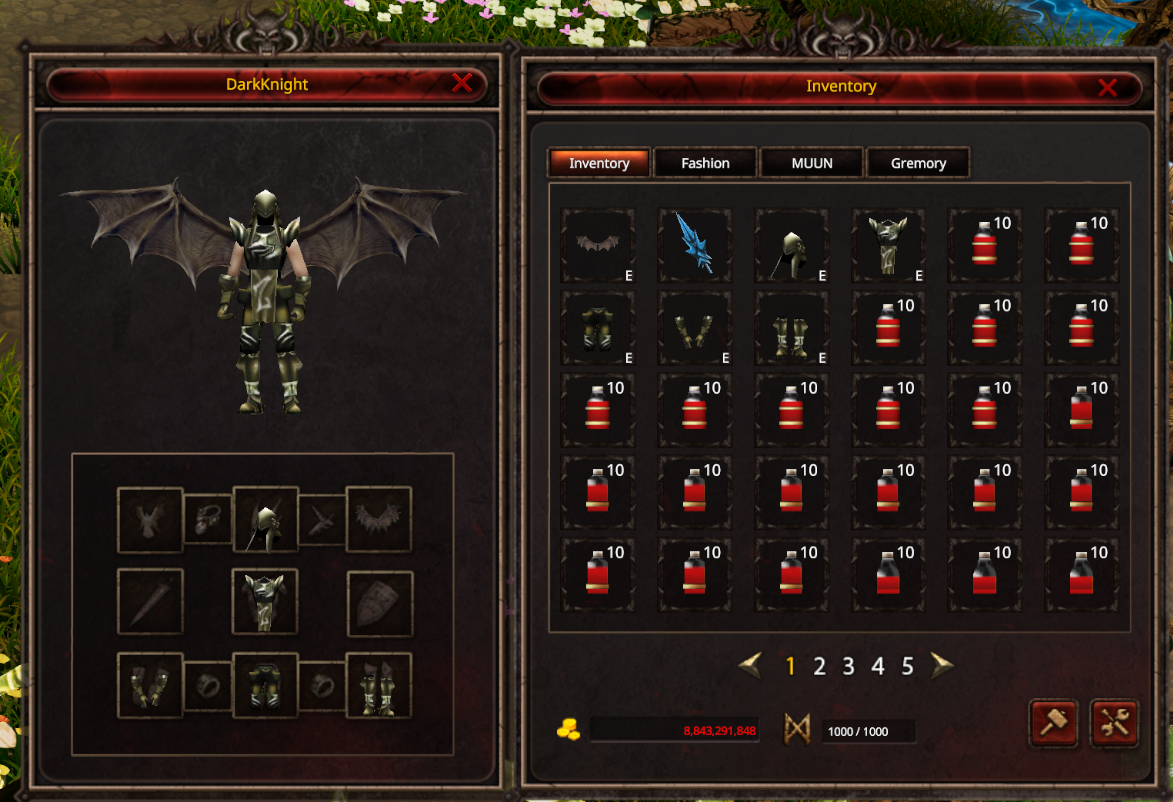
Inventory Tabs

Navigate your loot effortlessly! Switch between different item management tabs using the top menu bar:
Inventory:
Your character's main stash. Use this space to store loot, equip your hardcore gear, use consumables, and manage your everyday items.
Fashion:
Your cosmetic wardrobe! Equip fashion and decorative items here to customize your ultimate look without messing up your main combat stats.
MUUN:
The command center for your Muun companions and special pets. Equip them and check their specific details and stats right here.
Gremory:
Your secure vault for special rewards! Event loot, system payouts, and content rewards are stashed here. Check and claim your epic drops when you're ready—but beware, items here expire in 7 days!
Expanding Your Space: Switch between your inventory pages using numbers 1–5.
Each page holds 30 slots, giving you a massive maximum capacity of 150 slots across 5 pages!
(Alpha Test Bonus: You can unlock expanded bag pages 3, 4, and 5 simply by clicking their numbers. The unlock cost is set to 100,000 Zen specifically for the Alpha Test!)